In the ever-evolving world of creator gear and workstation accessories, versatility and integration are increasingly important. The CyberAxon D3 13‑in‑1 Multi‑Function Stream Control Dock, by the Hong Kong-based brand RayCue, presents an ambitious attempt to combine high-end docking station capabilities with streaming control hardware—essentially merging a USB-C hub with a mini programmable stream deck. In this article we’ll dive deep into its features, examine how it stacks up for creators, pros & cons, and evaluate whether it’s a solid investment for your workflow.
What is the CyberAxon D3?
At its core, the CyberAxon D3 is a “13-in-1” docking station designed for modern laptops or workstations (Windows, macOS, etc.) that need strong connectivity as well as creative workflow controls.
Key characteristics:
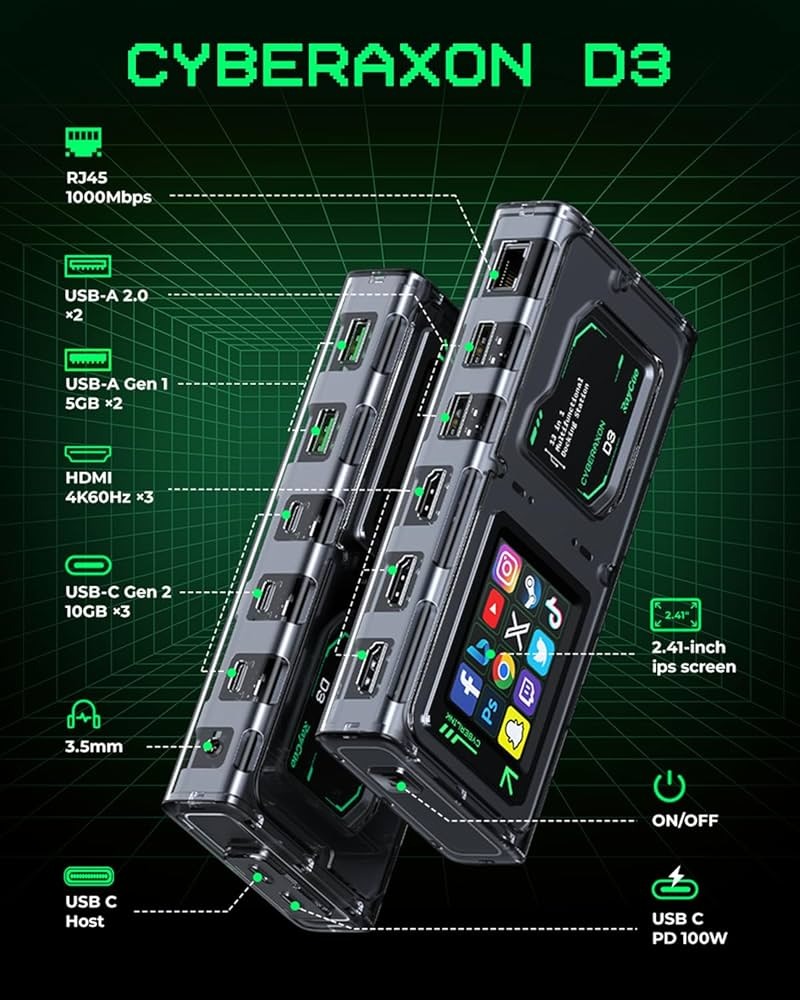
- It offers 13 distinct ports (hence the “13-in-1” designation). kickstarter.com+3backerviews.com+3kickstarter.com+3
- Among these ports: three HDMI outputs (capable of triple 4K at 60Hz or one 8K display) according to the Kickstarter listing. kickstarter.com+1
- USB-C Gen 2 ports (10 Gbps), USB-A ports, Ethernet, audio, plus power delivery (PD) up to 100 W. backerviews.com+2kickstarter.com+2
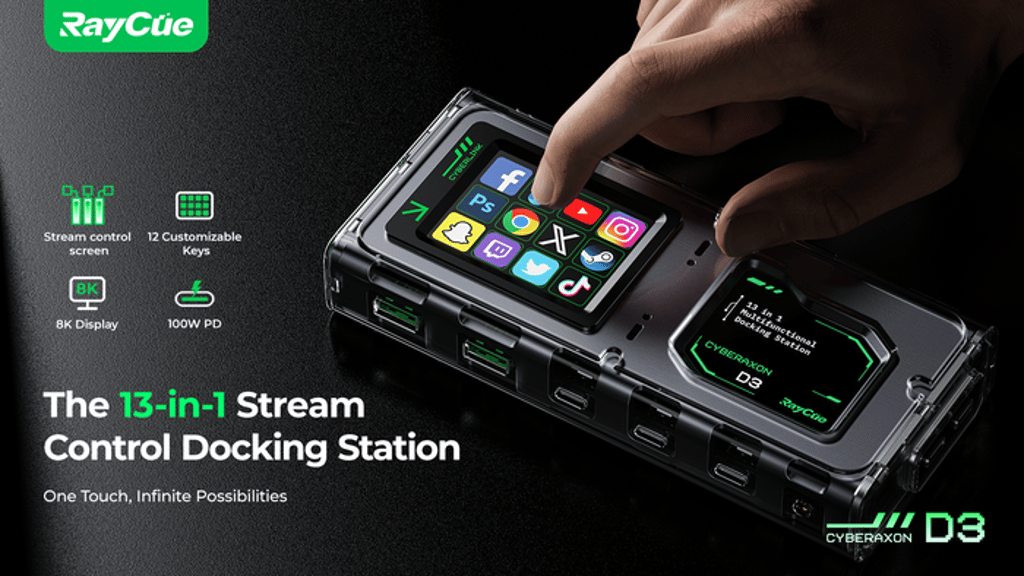
- Built-in streaming control interface: a 2.41″ IPS touchscreen plus 12 customizable keys (LCD keys) for one-touch control of apps, macros, stream scenes, audio levels, etc. kickstarter.com+2backerviews.com+2
- Aesthetic & build: Transparent or semi-transparent case, heat-dissipating aluminium alloy elements, cyperpunk / creator-geek styling. backerviews.com
- Crowdfunding origin: It was launched via Kickstarter and exceeded its funding goal (target HK$39,000 vs actual ~HK$888,200) which suggests demand and hype around the product. BackerKit+1
In short: The CyberAxon D3 is not just another USB-C hub—it tries to serve as a docking station and a stream deck/control interface for creators and professionals.
Why it matters for creators & workstation users
For many modern workflows—especially in content creation, live streaming, video editing, podcasting, hybrid remote work—there are three major demands:
- High connectivity: Many laptops now ship with few ports (often just USB-C/Thunderbolt). To connect multiple monitors, audio rigs, Ethernet, external SSDs, and charge simultaneously, a full-featured hub/dock is needed.
- Multiple displays: Whether editing video, switching live scenes, or working with reference and timeline windows, multiple monitors (4K or higher) are increasingly standard.
- Quick control & automation: Creators often benefit from one-touch controls—switching scenes, toggling cameras, controlling OBS, sending commands, adjusting audio. Rather than reaching for a separate stream deck, having controls built into the hub saves space and simplifies setup.
The CyberAxon D3 targets exactly all of these points: it supports triple high-resolution monitors, strong data and charging capabilities, and adds a built-in stream control interface. For creators with limited desk space or who want to simplify wiring, this makes sense.
Moreover, the crowdfunding success suggests that users are excited for this kind of hybrid device. It can reduce the number of discrete devices on the desk (dock + stream deck + hub → one unit).
Detailed Feature Breakdown
Ports and display support
According to specification disclosures:
- HDMI Ports: 3 × HDMI outputs (supporting 4K@60Hz or even 8K@30Hz and 4K@120Hz depending on the configuration) as listed in the Kickstarter campaign. kickstarter.com+1
- USB-C Gen 2 Ports: 3 × USB-C (10 Gbps) according to description. kickstarter.com
- USB-A Ports: Two USB-A Gen 1 (5 Gbps) plus additional USB-A 2.0 ports listed. kickstarter.com+1
- Power Delivery (PD): Up to 100 W PD charging support—meaning you can charge a laptop via the hub while connected. backerviews.com+1
- Other Connectivity: Ethernet port, audio out, etc (common for docks though specific specs beyond those major ones are less detailed in public pre-launch info).
- The material build: aluminium alloy + transparent casing for heat dissipation and style. backerviews.com
Stream/Control Interface
- 2.41″ IPS touchscreen + 12 customizable LCD keys: This allows mapping actions like launching apps, switching scenes, controlling audio, etc. kickstarter.com
- The FAQ lists support for customizing keys, using all HDMI ports simultaneously, using the dock standalone, etc. kickstarter.com
Design & Build
- Unique aesthetic compared to standard docks. Described as “cyberpunk-inspired” with LED accents in reviews. YouTube+1
- Transparent casing parts highlight internal components—a visual statement device for creator/VFX space, rather than purely functional.
- Cooling and heat dissipation is emphasized due to the high throughput of ports. backerviews.com
Crowdfunding & Market Position
- The Kickstarter campaign launched Oct 16 2024 and ended Nov 25 2024. BackerKit+1
- The goal was HK$ 39,000; actual funding ~HK$888,200. kickstarter.com+1
- Being a crowdfunding product means: early-adopter risk, potential delays, but also strong community backing.
Use Cases: Who is this for?
Content creators & streamers
If you run a streaming setup using multiple cameras, monitors, audio interfaces, and a laptop or desktop, the built-in control interface plus docking capabilities make the CyberAxon D3 attractive. For instance:
- Use the LCD keys to switch scenes in your streaming software (e.g., OBS, vMix)
- Use the HDMI ports to feed external monitors/preview screens
- Use the touchscreen for quick adjustments (volume, camera source)
- Use the dock to charge your laptop while having access to Ethernet (for stability) and high-speed SSDs or capture devices
Hybrid remote workers / power users
If you’re a professional using multiple monitors, external drives, need charging, and occasionally use macros or quick app switching, this hub can simplify your desk. Rather than a separate macro-pad or stream deck, the hub integrates everything.
Designers / Video editors
Video editing and design often require large external monitors, storage, and connectivity. The 100 W PD means you can use a laptop, hook up triple 4K monitors, external SSDs, and still keep charging—eliminating multiple adapters.
Pros & Highlights
- Very strong connectivity: triple monitor support (4K/8K), 100 W PD, multiple high-speed ports.
- Integration of stream deck-style controls directly into the hub: fewer devices on the desk, cleaner workflow.
- Aesthetic build: appeals to creators who care about look as much as function.
- Crowdfunded success suggests community interest and validation of concept.
- Potential to simplify wiring and docking for creator/worker setups.
Cons & Caveats
- As with many crowdfunded devices, the product may face delays, firmware/software bugs, or potential compatibility issues.
- Price may be higher than a more standard hub plus separate stream deck; the premium may be for integration and aesthetics.
- Some specs are pre-launch and may change; resolution support (like 8K@30Hz) may require specific host device capabilities.
- The control interface (customizable keys + touchscreen) will depend on software driver support, platform compatibility, and updates—may require setup time.
- If you only need basic docking (one monitor, few ports), the extra features may be overkill.
How it compares to alternatives
A typical workflow might involve two devices: a docking station + a separate stream deck (e.g., from Elgato). The CyberAxon D3 merges them. Here are some comparison points:
- Standard docking station: Offers multiple ports but no built-in macro controls.
- Separate stream deck: Offers control but relies on separate USB hub or host device.
- CyberAxon D3: Combines both—so fewer devices, less wiring.
- However: If you already own a stream deck and a separate dock, cost savings might be less; the D3’s value is higher for those building new setups.
Setup & Workflow Tips
Here are some suggestions to get the most out of the CyberAxon D3:
- Ensure laptop compatibility: Make sure your laptop supports the required display outputs (e.g., USB-C display alt mode, or Thunderbolt, to drive triple monitors or 8K).
- Firmware/software install: For the customizable keys and touchscreen to work, install any drivers or configuration software from RayCue. Make macro profiles for your streaming software, editing suite, or app-switching.
- Cable management: Leverage the hub’s high-power PD to reduce separate chargers; run one USB-C to your laptop and other devices through the dock.
- Monitor configuration: If using triple monitors: check the host GPU/laptop supports triple output at required resolutions via the hub. If you bump into limitations, maybe reduce to dual monitors to ensure stability.
- Macro mapping: Use the 12 LCD keys for your most-used actions: mute/unmute, scene switch, clip marker, audio toggle, start/stop recording. The touchscreen can show status or alternative controls.
- Heat/dissipation: Even though the device is designed with heat management, ensure it has ventilation space. If you run high loads (multiple 4K streams, external SSDs), monitor for warm surfaces.
- Update firmware: Crowdfunded gear often gets updated firmware; check for updates regularly to gain stability, new features, or compatibility fixes.
Is it worth buying now?
If you’re in the market for a serious upgrade and fit one of these profiles:
- You stream, edit, or create on a laptop/desktop and want to streamline your desk setup.
- You use multiple external monitors (4K or higher) and need strong hub connectivity.
- You appreciate integrated macro controls and want to reduce the number of separate devices.
Then yes—the CyberAxon D3 presents compelling value, especially as a next-generation hub.
However, if you:
- Use a simple setup (one monitor, few devices)
- Already own a separate stream deck and hub and are cost-sensitive
- Prefer a product with long market presence (rather than newer crowdfunded gear)
Then you might want to wait for full release reviews, early user feedback, price drops or peer review benchmarks.
Final Thoughts
The CyberAxon D3 13-in-1 Stream Control Dock is a bold hybrid device that taps into two major trends: the need for high-performance docking (multi-monitor, high throughput, fast charging) and the rise of creator workflow optimization (stream deck-style controls). By combining these, RayCue is positioning the D3 as a “creator’s command center” rather than just a hub.
For professionals and creators looking to upgrade their desk and workflow, it may well be a smart investment—especially if you value the integration and aesthetic. That said, as with all crowdfunded hardware, patience, due diligence, and checking for final retail release details are advised.