The smartphone world is moving fast, and software updates are taking on more significance than ever. For fans of OnePlus, the arrival of OxygenOS 16 marks a major leap—not just in aesthetics and performance but in how the phone begins to think alongside you. With deep AI integration and the elegant Flux 2.0 theme engine, OnePlus is aiming for an OS that’s not just cleaner or faster, but smarter and more personal.
Here’s a deep dive into what this update brings, how it changes the OnePlus experience, and what to keep in mind if you’re planning to upgrade or are waiting for the rollout.
What is OxygenOS 16?
At its core, OxygenOS 16 is the next-generation software for OnePlus devices, built on top of Android 16 and incorporating OnePlus’s own design and feature enhancements.
Some of the headline items:
- A renewed design aesthetic: smoother animations, blur/translucent effects, refined iconography.
- Major customization upgrades via the new Flux 2.0 theme engine.
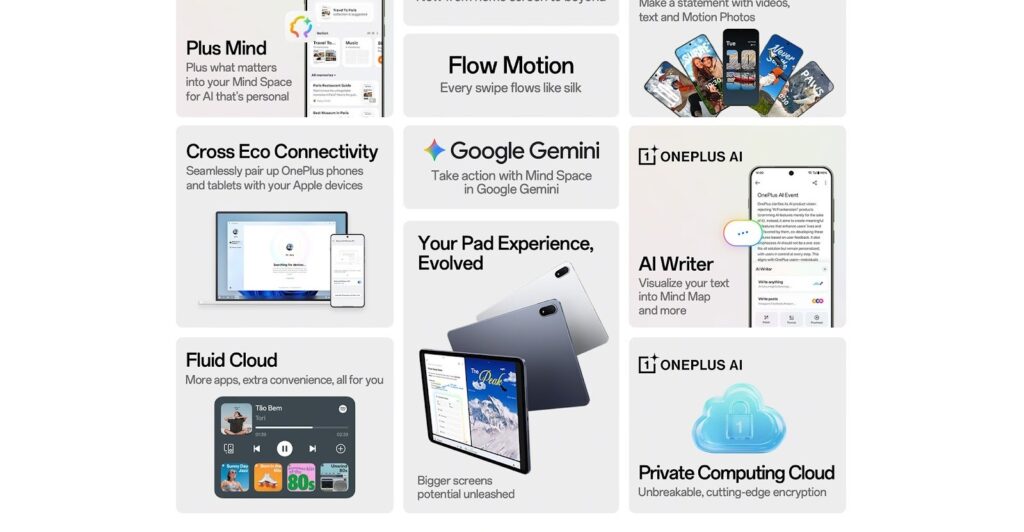
- AI-powered tools and deeper integration of Google Gemini into OnePlus’s workflows (via Mind Space, etc.).
- Cross-device connectivity enhancements, improved UI fluidity, and more organized home/app drawer systems.
In short: it’s a big update. OnePlus calls the philosophy behind it “Intelligently Yours.”
AI integration: Smarter every step of the way
One of the most talked-about parts of OxygenOS 16 is how much more “intelligent” the OS aims to be—and by intelligent I mean: proactive, context-aware, and supportive rather than just functional.
Plus Mind & Mind Space
Through the “Plus Mind” concept and the “Mind Space” hub, OnePlus introduces a system where you’re encouraged to save screenshots, notes, voice memos, web clippings—and the OS uses that data to make suggestions, organise content, or assist in tasks.
For example: you take a photo of an event poster → the system suggests adding the date/time to your calendar.
Google Gemini integration
What makes this deeper is the pairing with Google Gemini. Your saved content (in Mind Space) can now be queried via Gemini, so you’re not just looking at “saved screenshots” but asking “show me the hotel options I saved last week” or “summarize my meeting notes” and getting intelligent responses.
This is a big step towards using a phone as a productivity and smart-assistant hub, not just a device.
Helpful AI tools included
Some tools that OxygenOS 16 brings:
- AI Writer: Generate captions, mind-maps, summaries from text.
- AI Scan: Use the camera to capture documents, whiteboards, convert to PDF, clean up images.
- AI Portrait Glow / AI Perfect Shot: For photos—e.g., swapping expressions, improving low-light portraits.
Taken together, this means the OnePlus phone becomes more than hardware—it becomes part of your workflow and memory bank.
Flux 2.0 Theme Engine: Customisation elevated
Let’s talk aesthetics. OxygenOS 16 doesn’t just add features; it upgrades how your phone looks and feels—and a major driver of that is Flux Themes 2.0.
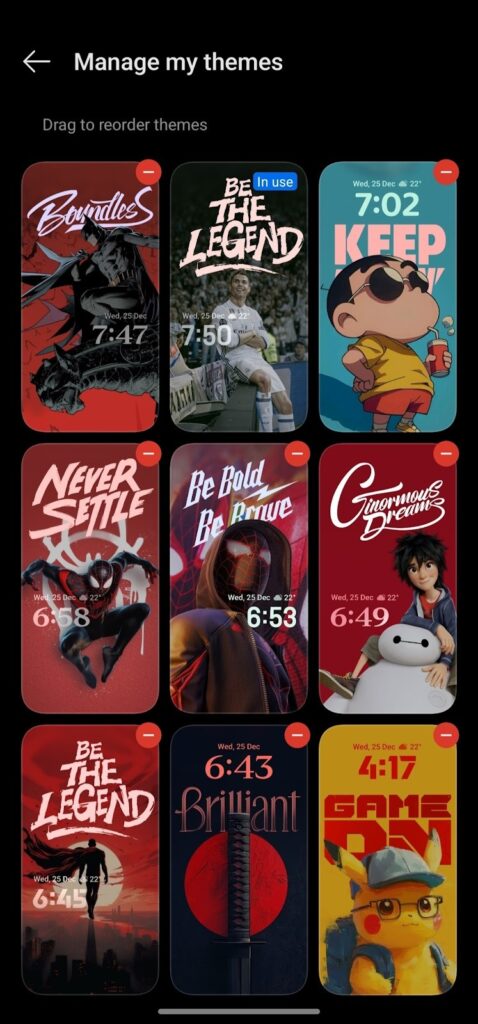

What’s new with Flux 2.0?
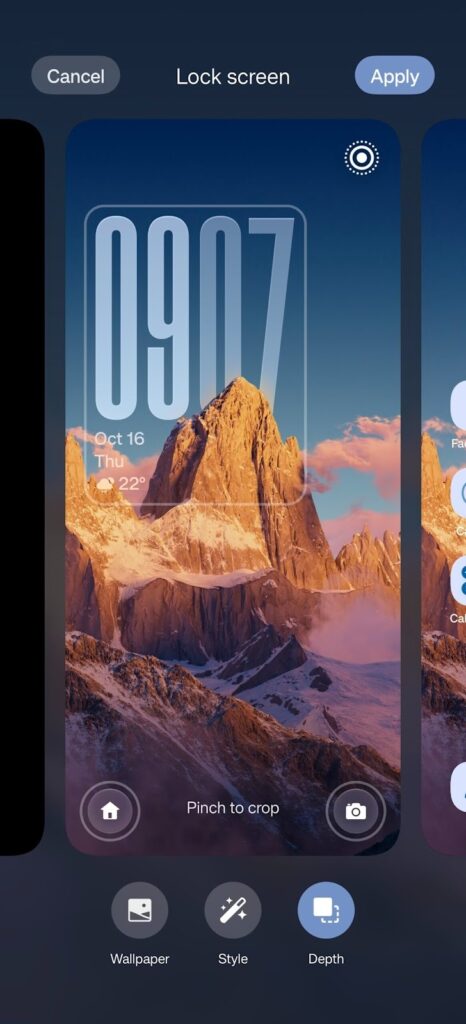
- The lock screen now supports motion photos or video wallpapers, and depth effects where the clock or word art can sit behind parts of the wallpaper subject.
- More dynamic and customisable: you can edit text effects, choose custom fonts or word art, rather than just selecting from presets.
- Icon theming goes further: auto-themed icons system-wide (home, app drawer, settings) for a more cohesive look.
- Home screen improvements: adjustable icon/folder sizes, category-based app drawer, more layout options (e.g., 5×7 grid).
Why this matters
Customisation used to mean “change wallpaper, pick icon pack”. Now it means “make the phone look the way you imagine, with dynamic motion, layered depth, system-wide coherence.” For users who care about aesthetics—or want their phone to stand out—this is a big win.
Performance, connectivity, and UX refinements
Beyond AI and themes, OxygenOS 16 brings a slew of quality-of-life upgrades and refinements:
Fluid animations & responsiveness
Using a system called Parallel Processing 2.0, OnePlus has improved the fluidity of transitions and animations so that opening/closing apps, switching screens feels smoother and faster.
More visually, expect Gaussian blur effects, translucent panels, more visual polish.
Improved home/app drawer experience
The launcher upgrades include:
- Scalable icons/folders.
- App drawer with “Categories” tab that groups apps automatically (Social, Entertainment, Photography etc) alongside classic alphabetical view.
- Better widget placement and sizing options.
Cross-device and ecosystem connectivity
OnePlus extends device interoperability:
- Sharing photos between OnePlus and iPhones quickly.
- Basic pairing with Apple Watch (notifications/sync) via OnePlus’s “O+ Connect” type functionality.
- Remote control for PCs (Windows/Mac) from phone or tablet in supported setup.
Security and privacy upgrades
Though less visible, OnePlus highlights its “Private Computing Cloud” architecture: data routed based on sensitivity, hardware-level protection (CPU/GPU), Trusted Execution Environment.
Devices & rollout: When you’ll get it
The update is being rolled out in phases. Key points:
- The first device to ship with OxygenOS 16 out of the box is the upcoming OnePlus 15.
- Open beta begins around October 17, 2025.
- Rollout to older devices (OnePlus 13, 13 R, 12, Pad 3 etc) will happen through November and into early 2026.
If you’re a OnePlus user, check the announcement for your specific model and region. As always with major OS updates: ensure your data is backed up, you have enough battery, and stable WiFi.
Why it matters: The bigger picture
This launch isn’t just incremental—it reflects how OnePlus positions itself in the Android ecosystem, and how smartphones are evolving.
The shift from “fast hardware” to “smart software”
In earlier eras, OnePlus stood out for hardware specs and speed (“flagship killer”). With OxygenOS 16, the emphasis shifts toward software experience, intelligence, and ecosystem integration.
Your phone becomes not just powerful, but aware of you.
Customisation as identity
Flux 2.0 underscores how smartphone UI is becoming a form of self-expression. The lockscreen, icon pack, animations—all become part of your digital identity. OnePlus is leaning into that.
AI everywhere, but thoughtfully
This isn’t gimmicky AI; it’s woven into system workflows (Mind Space + Gemini), camera tools, note-taking, document scans. If it works well, it may push other manufacturers to up their game.
Blurring device silos
By improving interoperability with iPhones, Apple Watch, Macs/PCs, OnePlus acknowledges that users don’t live in a single-brand bubble. Your phone is part of a larger digital life—and the OS needs to reflect that.
What to watch out for / potential drawbacks
While OxygenOS 16 looks great on paper, here are some caveats and things to consider:
- Rollout fragmentation: Some features may arrive later, or your region may get the update later. Wait time might vary.
- AI feature availability: Some AI tools may be region-locked, or reliant on cloud services and permissions. The full Gemini/Mind Space experience may require server support.
- Learning curve: With so much customisation and new features, there may be a bit of a learning curve to use everything effectively—especially Mind Space and advanced tools.
- Performance on older devices: Flagship devices will shine; older or mid-range OnePlus phones may get the update but might not deliver the full “fluid” experience or support every AI feature equally.
- Privacy & data: With increased AI and data collection (screenshots, voice memos, notes), be mindful of what you share and how you set permissions.
Final thoughts
With OxygenOS 16, OnePlus has delivered a software upgrade that feels both major and mature. The combination of AI integration, customization via Flux 2.0, and refined UI/UX shows the brand is evolving beyond raw specs toward crafting a holistic experience.
For OnePlus users, it’s a compelling reason to upgrade (if you’re eligible) or to consider a OnePlus phone if you’re in the market—especially if you care about how your phone thinks, responds, and looks, not just how fast it is.
If I had to summarise it in one sentence: OxygenOS 16 is Where OnePlus takes your phone from “tool” to “partner.”